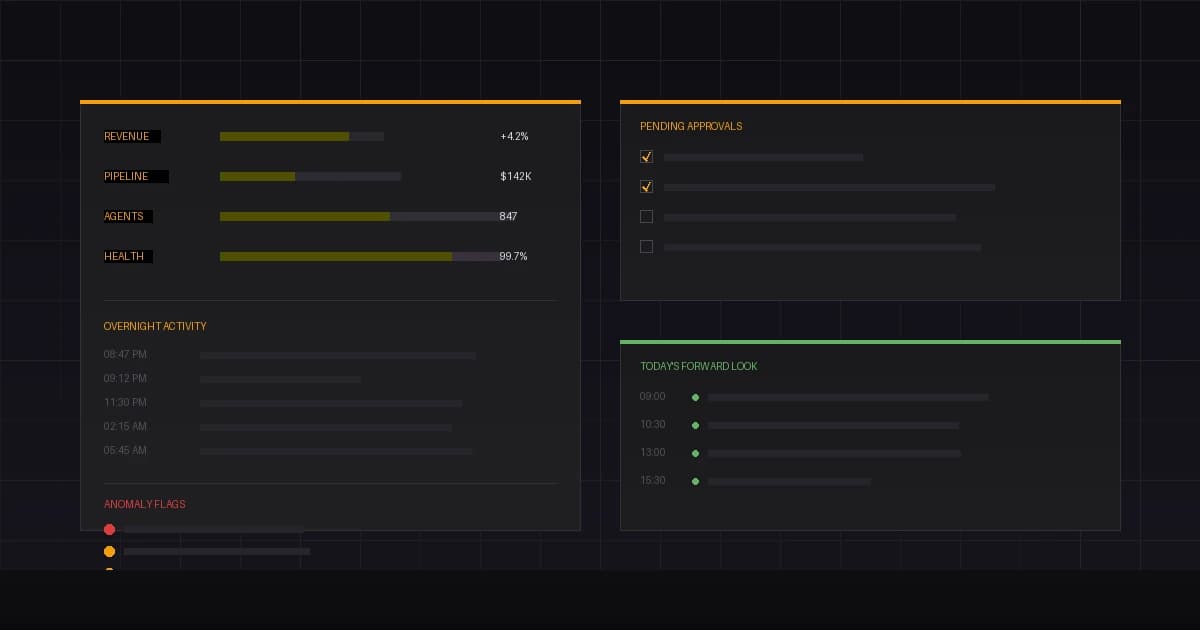
It is 6:14 AM on a Tuesday. You have not opened your laptop yet. You have not checked Slack, not refreshed your CRM, not skimmed your inbox for fires. But you already know three things: revenue is up 4.2% week-over-week, your sales pipeline has two deals that slipped stages overnight, and your marketing agent published a LinkedIn post at 7 PM last night that is outperforming your last twelve posts combined.
You know all of this because your morning briefing arrived two minutes ago. And unlike the dashboards you used to stitch together manually, this one was written by AI agents who actually did the work it describes.
This is what the briefing contains — line by line, section by section — and why each piece matters more than you might think.
Section 1: The Headline Numbers
The briefing opens with three to five metrics. Not twenty. Not a dashboard with fourteen tabs. A small, curated set of numbers that define whether yesterday was a good day or a bad one.
For most Palatai operators, those numbers include:
- Revenue vs. target — actual collected revenue against the daily or weekly goal, with a 7-day trailing comparison
- Pipeline movement — net change in deal value, new opportunities created, deals that advanced or stalled
- Agent output volume — total completed actions across all departments: emails sent, content published, leads qualified, invoices processed
- System health — uptime across connected integrations, failed webhook deliveries, API error rates
Each metric includes a directional indicator and a comparison window. You are not looking at raw numbers in isolation — you are looking at whether things are trending in the right direction relative to last week and last month.
Section 2: Overnight Activity Log
This is the part that separates an AI briefing from a standard dashboard export. Your agents did not stop working when you closed your laptop.
The overnight activity log is a chronological record of everything your AI team executed between your last session and now. It reads like a shift report from a night crew, because that is exactly what it is.
You are not reading all of this in detail. You are scanning for volume and anomalies. If your sales agent usually sends 4–8 follow-ups and tonight it sent 23, that is worth a look. If your operations agent usually reconciles records in under a minute and tonight it took eleven, something changed.
The log is there for accountability. Every action an agent takes is recorded with a timestamp, the triggering condition, and the outcome. This is how autonomous operations stay auditable.
Section 3: Anomaly Flags
This is the section that earns the briefing its keep. Anomaly flags are the items your agents identified as outside normal operating parameters but could not resolve on their own.
Anomaly detection in Palatai is not a separate analytics product bolted on to the side. It is built into how agents operate. Every agent maintains a rolling baseline for the metrics it monitors. When something deviates beyond configured thresholds, it gets flagged — not buried in a log file, but surfaced directly in your morning briefing.
Common Anomaly Flags
- Revenue anomalies — an unexpected spike or drop in daily revenue exceeding the 7-day standard deviation
- Pipeline irregularities — a deal moving backward in stages, a contact marked as lost who was in active conversation 24 hours ago
- Engagement outliers — content performing 3x above or below its predicted engagement range
- Integration failures — a webhook that stopped delivering, an API connection returning errors overnight
- Behavioral drift — an agent producing outputs that diverge from its configured parameters
Each flag includes three pieces of context: what happened, why the agent flagged it, and what the agent recommends. You decide whether to act, dismiss, or adjust the threshold.
Research from IBM found that teams operating with structured human-in-the-loop oversight are twice as likely to achieve 75% or greater cost savings from AI deployments. The anomaly section is where that oversight happens in practice — not as a bureaucratic review process, but as a targeted scan of the things that actually need your judgment.
Section 4: Pending Approvals
Some actions require your sign-off before agents can proceed. The pending approvals section is your decision queue.
In Palatai, approval gates are configurable per agent and per action type. You decide which actions your agents can execute autonomously and which ones need a human green light. Common approval triggers include:
- Outreach to contacts above a certain deal value
- Content that references pricing, legal terms, or competitive claims
- Expenditure requests above a dollar threshold
- Communications to VIP accounts or flagged contacts
- Any action that would modify data in a connected system of record
The briefing presents each pending item with the full context your agents assembled: the proposed action, the data that triggered it, the expected outcome, and any relevant history. Your job is to approve, modify, or reject — then move on.
The goal is to clear this queue in under three minutes. If you are spending more than five minutes on approvals every morning, your thresholds are probably too tight. Loosen the guardrails on low-risk actions, keep them firm on high-stakes ones, and revisit monthly.
Section 5: Today's Forward Look
The final section is not about what happened. It is about what is about to happen.
Forward Look Contents
- Scheduled actions — content going live, emails queued to send, reports scheduled for generation
- Triggered workflows — sequences that will fire if certain conditions are met (a lead hits a scoring threshold, a deal passes a stage gate, a support ticket remains unresolved past SLA)
- Calendar context — your meetings for the day, enhanced with CRM data, preparation notes, and suggested talking points pulled from recent activity
- Resource forecasts — projected API usage, email send limits, or any capacity constraints that might affect operations
This section exists because surprises are the enemy of operator confidence. If your marketing agent is about to publish a blog post you have not reviewed, you want to know before it goes live — not after. If your sales agent is about to send a follow-up to a prospect you are meeting for lunch, you want to catch that conflict at 6 AM, not at noon.
Gartner projects that 40% of enterprise applications will embed autonomous AI agents by the end of 2026. The operators who will manage those agents effectively are the ones who build forward visibility into their operating rhythm from the start.
What the Briefing Does Not Contain
Knowing what is excluded matters as much as knowing what is included.
- Raw data exports — no CSV dumps, no unfiltered log files. Every data point is contextualized.
- Agent-to-agent communication logs — your agents coordinate with each other constantly, but you do not need to see every internal handoff. Those logs exist for debugging, not for morning reading.
- Routine completions below threshold — if your social media agent posted daily and it posted daily, that does not need a line item. Only deviations and notable outcomes surface.
- Speculative recommendations — the briefing reports what happened and what is planned. It does not editorialize about strategy. That is your job.
This restraint is intentional. The briefing that tries to be everything becomes the briefing no one reads. Ours is designed to be finished in under five minutes, acted on in under three, and forgotten by the time your first meeting starts.
The Compound Effect
Here is the part that does not show up in any single morning briefing but becomes obvious after thirty days.
When your agents operate continuously and report consistently, you accumulate a decision-making record. Every approval, every dismissal, every threshold adjustment — it all compounds. Your agents learn your preferences. The anomaly flags become more precise. The approval queue shrinks as the system calibrates to your risk tolerance.
After the first month, most operators tell us the same thing: the briefing got shorter. Not because less is happening — more is happening. It got shorter because the agents got better at knowing what deserves your attention and what does not.
That is the difference between a dashboard and a briefing. A dashboard shows you everything and asks you to find what matters. A briefing shows you what matters and trusts you to ask for more if you need it.
See It for Yourself
The morning briefing is one of the first things operators notice when they start a Palatai pilot. Within the first week, your agents are trained on your business data, your integrations are connected, and the briefing starts arriving on your schedule.
No 47-minute morning ritual. No six dashboards. No guessing what happened overnight.
Just the information you need, delivered by the team that created it.
Frequently Asked Questions
How long does it take to set up the morning briefing?
The briefing is configured as part of your pilot onboarding during the first week. Once your integrations are connected and your agents are active, the briefing begins generating automatically. Most operators receive their first briefing within 48 hours of activation.
Can I customize which sections appear?
Yes. Every section is configurable. If you do not need the overnight activity log in detail, collapse it to a summary count. If you want anomaly flags for specific departments only, filter by department. The briefing adapts to what you actually want to see each morning.
What if I want more detail on a specific item?
Every line item in the briefing links to its full context in the Palatai dashboard. The briefing is a surface — tap any item to see the complete activity history, agent reasoning, and related data.
How is this different from the daily digest guide?
Our daily digest guide explains how to read the briefing efficiently using the traffic light method. This article goes deeper into what each section contains, why it is structured the way it is, and how the data gets there in the first place.
Sources